


Vocal Remover - Musiclab
4.6476.00 Reviews
App Specs
- Version
- 2.5.2
- Updated On
- License
- Free
- Downloads
- 1,000,000+
- Developer
- EaseUS
- Categories
- Music & Audio
- Platform
- Android, iOS
Screenshots
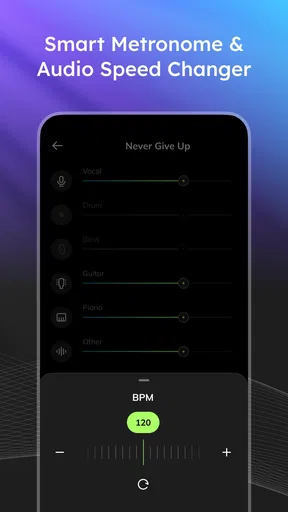
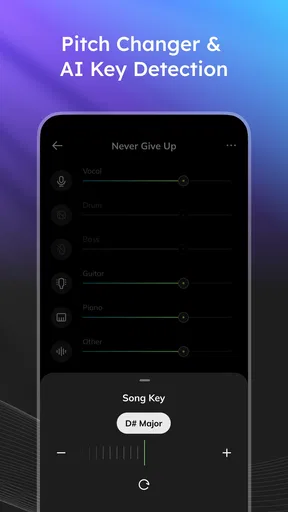
 Analysis by AppCompare
For a quick karaoke version or a rough vocal-and-instrumental split, Vocal Remover - Musiclab is most useful when I treat it as a practical music tool, not a magic cleanup button. It gives casual users a direct route from a song on a device to an altered track, and the appeal is easy to understand: I can try an idea without first learning a full audio workstation. The trade-off is that separation quality depends on the song, so I would listen carefully before relying on the result for a performance or polished project.
Where a phone-based splitter earns its place
The best reason to use this app is convenience. If I want to rehearse a melody, test a harmony, or make an informal sing-along track, opening a mobile app is simpler than moving a file into desktop editing software. It is also a focused option in the music and audio category: rather than asking me to build a whole production setup, it centers the experience on separating parts of a song and making the result easy to use.
A realistic use might start with a song already saved on my phone. I could create a version with the vocal reduced, play it through a speaker while practicing, and then adjust the sound if the accompaniment needs a little more weight or clarity. That is a handy workflow for a living-room karaoke session or a quick rehearsal between other tasks. I would keep the original file untouched and compare it with the processed result; that makes it easier to decide whether the separation is good enough for the purpose.
What to listen for after processing
Vocal separation is not the same as having access to the original studio stems. When vocals and instruments overlap in pitch or are heavily blended in the mix, a splitter may leave traces of the voice or soften parts of the accompaniment. A track with a clear lead vocal and a fairly open arrangement may come out more usefully than a dense production with layered voices and effects. I would judge the output by listening to the sections that matter most, such as a chorus or a quiet verse, rather than assuming the whole song has been cleaned equally.
There is a useful distinction between “good enough to practice with” and “clean enough to publish.” For singing along, a little residue may not matter. For a public performance, a remix, or a recording where the instrumental is exposed, those artifacts can be distracting. If precision is the priority, a desktop audio editor or a service that offers more control over source separation may be a better fit, though it can take more time and effort than a quick phone workflow.
Small workflow choices that improve the result
I would start with the cleanest copy of a song available on the device, rather than a recording captured from a speaker or a compressed clip passed through several apps. Every extra layer of noise or compression can make it harder to judge the separation. It also helps to try a short, representative section first when possible, especially if I only need the track for a particular chorus or verse. That avoids spending time building a full workflow around a result that does not suit the song.
After processing, I would listen once on headphones and once on the speaker or headphones I plan to use for practice. Headphones reveal faint vocal remnants and rough edges; a room speaker gives a better sense of whether the backing feels balanced at normal volume. If the app’s equalizer is available for the task, gentle changes are usually more sensible than pushing bass or treble hard: heavy boosts can make artifacts more obvious rather than fixing them.
Worth Reading Before You Choose

Flipboard Shows What News Apps Must Do Beyond the Feed

Switching to Android Auto Means Rethinking Your Driving Routine

Google Calendar Makes a Crowded Week Easier to Manage

Ludo King Makes the Most of the Minutes Between Plans

Baby Panda World Brings Quick Play to Modern Phones, but Its Game Library Feels Busy

ESPN’s Live Game View Makes Following Close Games Easier
Who should choose another approach
This is a better match for casual singers, music fans who like experimenting, and musicians who need an easy practice aid than for someone expecting pristine stems for a commercial release. It is also not the best choice if I need detailed editing, multitrack arrangement, or precise control over every processing decision. In those cases, a desktop editor is more capable, while a karaoke catalogue can be simpler if the only goal is to sing along to officially prepared backing tracks.
It is worth considering the cost model before building a routine around it. Vocal Remover - Musiclab is free to download, with in-app purchases listed from $14.99 to $89.99 per item. I would try the basic experience first and decide whether the app’s results fit my needs before paying for anything. That is particularly important if I only want an occasional karaoke file rather than a tool I expect to use regularly.
The app is rated for Everyone, and EaseUS is the developer. Its average rating is 4.5 from around 35,000 ratings, with more than one million installs. Those figures suggest that it has found a broad audience, but they cannot tell me whether a particular song will separate cleanly; the most useful test is still trying a track similar to the one I intend to use.
On Android, the listed minimum operating-system requirement is version 7.0, and version 2.4.2 is the current release. It was released on March 26, 2024. For someone deciding whether to install it, the practical point is to check that the device meets the requirement and to approach it as a focused splitter rather than a full recording studio.
Ever found yourself humming along to a song, wishing you could just have the backing track to belt out your own rendition? Well, that's where Vocal Remover - Musiclab steps in to save the day. This nifty app promises to strip the vocals from your favorite tracks, turning them into karaoke-ready versions. I decided to give it a whirl and see if it lives up to the hype.
Getting Started with Vocal Remover
Setting up the app is a breeze. Available on both Android and iOS, you just need to download it and you're ready to dive in. The interface is clean and straightforward, which is a relief for someone like me who doesn't want to spend hours figuring out how to get things going.
The app opens up to a simple home screen with a clear option to upload a song from your device. The process is quite intuitive—just tap and select the track you want to transform. It's user-friendly and doesn't bombard you with unnecessary features, sticking to what it does best.
How Does It Work?
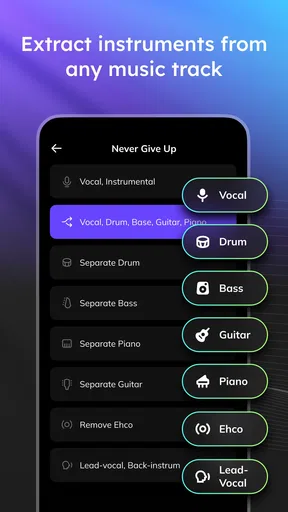
Once you select a track, the magic happens. The app uses some complex algorithms to separate the vocals from the music. Now, I'm no tech wizard, but the results are impressive for an app running on a mobile device. Within a few minutes, you'll have a track with significantly reduced vocals, ready for your karaoke party.
What I found particularly cool is the app's ability to maintain the quality of the music. Sometimes, in my experience with other apps, removing vocals can distort the sound, but it manages to keep the backing track pretty clean.
Additional Features
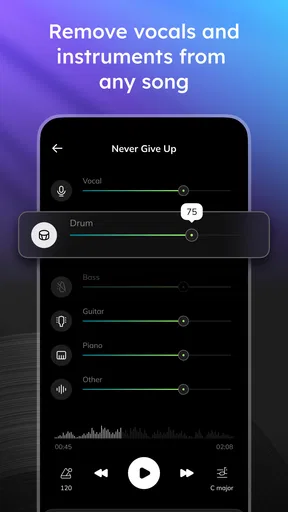
While vocal removal is the main feature, the app doesn't stop there. It also offers an equalizer feature, letting you tweak the sound to your liking. Whether you want to boost the bass or highlight the treble, you have the tools at your fingertips.
Another handy feature is the ability to save and share your new tracks directly from the app. So, once you've created your masterpiece, you can send it straight to your friends or upload it to your favorite social media platform.
Performance and Usability
In terms of performance, the app runs smoothly without any noticeable lag, even when processing larger files. It's lightweight, so it doesn't hog your device's resources, which is great if you're like me and tend to have a million apps open at once.
The design is intuitive with a minimal learning curve. Whether you're tech-savvy or a casual user, you'll find navigating through the app a breeze. The developers seem to have put a lot of thought into making it accessible to all users.
Is It Worth It?
So, is it worth downloading? In my opinion, absolutely. Whether you're a karaoke enthusiast, a budding musician looking to practice with backing tracks, or just someone who enjoys experimenting with music, this app is a fantastic tool.
While it's not perfect and might not completely erase vocals from every single track, it does a commendable job for a mobile app. Plus, the additional features like the equalizer and sharing options make it a well-rounded package.
In conclusion, Vocal Remover - Musiclab is a fun and functional app that delivers on its promises. It's simple, effective, and a welcome addition to any music lover's app collection. Give it a try, and who knows, you might just discover your inner rock star!
Pros
- Easy-to-use interface for quick editing.
- Supports a variety of audio formats.
- Removes vocals with high accuracy.
- Fast processing and export times.
- Includes additional audio effects.
Cons
- Free version has limited features.
- Occasional glitches with large files.
- Ads can be intrusive at times.
- Limited advanced editing tools.
- Requires internet for full functionality.
FAQs for Vocal Remover - Musiclab
What is the primary function of Vocal Remover - Musiclab?
Vocal Remover - Musiclab is designed to separate vocals from instrumental tracks in audio files. This app is perfect for users who want to create karaoke tracks or remix songs by isolating or removing vocals, allowing them to enjoy or manipulate music in creative ways.
Is Vocal Remover - Musiclab compatible with all audio file formats?
The app supports a variety of popular audio formats, including MP3, WAV, and FLAC. However, some less common formats might not be supported. Users should ensure their audio files are in a compatible format for optimal performance when using the application.
Does using Vocal Remover - Musiclab affect the quality of the audio?
While the app uses advanced algorithms to separate vocals and instruments, some quality loss may occur, particularly with complex tracks. Users should be aware that the outcome largely depends on the original audio quality and the intricacy of the music layers.
Is there a free version of Vocal Remover - Musiclab, and what features are limited?
Yes, there is a free version available, but it may have limitations such as processing time, file size restrictions, and access to advanced features. To unlock the full potential of the app, users can opt for a premium version with additional capabilities and no ads.
Can Vocal Remover - Musiclab be used offline?
Vocal Remover - Musiclab requires an internet connection for optimal performance, especially for processing and downloading files. However, once the files are processed, users can access and play them offline. It's best to check the app settings to understand its offline capabilities.


